
A very typical scenario in Excel when you get a data download with multiple entries for the same name/transaction is for the name to be entered once, then multiple transactions to be in another column beside it. However, if you need to filter or apply a pivot table to this data – you have to complete multiple entries for each name. It is possible to do this quite quickly in Power Query but if you don’t want to use Power Query – this is a way to do it in Excel. This is what pre-cleaned up data looks like. This is the starting file
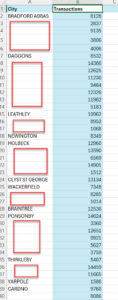
Here’s the video that shows you how to do it. Here is the completed file. I got the names from fakenamegenerator.com