
One slightly tricky aspect of working with Excel is dates. The key thing to remember is that for Excel the world began on 1/1/1900 which means that every date is a number that represents the number of days that have elapsed since then. If you import data from an external system, you will often see dates come in as 45000 plus.
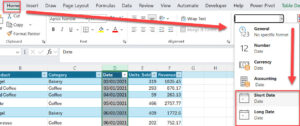
If you want to see them as dates – choose Home | General and choose Short Date or Long date from the dropdown.
You can review date functions here.
You can find out more about adding and subtracting dates here
You can learn more about formatting as time and date here
Mynda Treacy gives a really introduction to how Excel sees time here
This file (generated by AI) gives worked examples of date and time formulas and functions.